







Introduction
Nothing ruins a clutch gaming moment faster than lag.
- Introduction
- Boost Your Gaming Performance
- Slow Internet Connection
- Server Distance
- Network Congestion
- Background Downloads
- Poor Routing
- ExitLag
- WTFast
- NoPing
- Mudfish
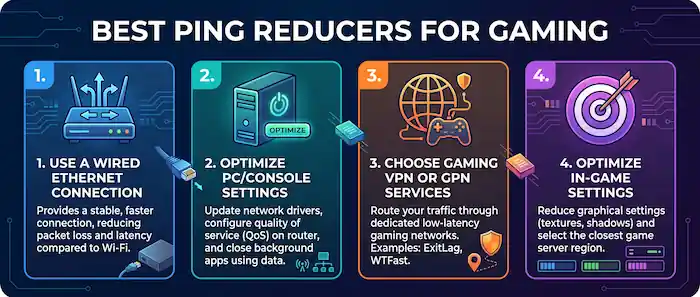
- Use a Wired Ethernet Connection
- Close Background Applications
- Choose the Closest Game Server
- Restart Your Router
- Upgrade Your Internet Plan
- First-Person Shooters
- Sports Games
- Battle Royale Games
- Fighting Games
You line up the perfect shot in a competitive match, press the trigger, and suddenly your screen freezes for half a second. By the time the game catches up, you’re already eliminated. Whether you play fast-paced shooters, sports simulations, battle royales, or MMORPGs, high ping can instantly destroy the experience.
Online gaming is more competitive than ever. Titles like Call of Duty, EA Sports FC, Fortnite, Valorant, and NBA 2K demand ultra-fast reactions and stable connections. Even a slight delay can make the difference between victory and defeat.
That’s why gamers around the world are searching for the best ping reducer for gaming. The good news? There are several effective tools and strategies that can dramatically improve your connection and reduce lag.
In this guide, we’ll break down the best ping reducers for online games, explain why ping spikes happen, and show you how to fix high ping while gaming for a smoother, more responsive experience.
Boost Your Gaming Performance
What Is Ping in Gaming?
Before diving into solutions, it’s important to understand what ping actually means.
Ping measures the time it takes for data to travel from your device to the game server and back again. It’s measured in milliseconds (ms).
General Ping Ratings for Gaming
- 0–20 ms: Excellent
- 20–50 ms: Very good
- 50–100 ms: Playable
- 100+ ms: Noticeable lag
- 200+ ms: Severe delay and rubberbanding
Low latency gaming is crucial for competitive players because faster response times lead to smoother gameplay and better accuracy.
Why High Ping Happens
Several factors can cause high ping while gaming:
Slow Internet Connection
A weak or overloaded internet connection is the most common reason for lag.
Server Distance
The farther you are from the game server, the higher your latency becomes.
Network Congestion
Too many connected devices can overload your bandwidth.
Background Downloads
Updates, streaming, and cloud syncing can consume internet resources without you realizing it.
Poor Routing
Sometimes your internet provider sends game traffic through inefficient routes, increasing delay.
Best Ping Reducers for Online Games
Here are some of the top ping reducer tools gamers are using right now.
ExitLag
ExitLag remains one of the most popular gaming VPN solutions for reducing ping.
Why Gamers Love It
- Real-time route optimization
- Multi-path connections
- Supports hundreds of games
- Stable FPS and lower packet loss
ExitLag works especially well for competitive esports titles where milliseconds matter.
Best For
- FPS games
- MOBA titles
- Competitive ranked matches
WTFast
WTFast is another strong option for gamers dealing with unstable connections.
Key Features
- Optimized game traffic routes
- Reduced jitter and packet loss
- Easy setup for beginners
Many MMORPG and online sports gamers prefer WTFast because it improves server communication consistency.
NoPing
NoPing has gained popularity thanks to its wide global server coverage.
Advantages
- Works with over 1,000 games
- User-friendly dashboard
- Great for international gaming servers
Players connecting to overseas servers often notice major improvements with NoPing.
Mudfish
Mudfish is a budget-friendly ping reducer that appeals to advanced users.
Why It Stands Out
- Pay-as-you-go pricing
- Lightweight software
- Custom routing control
It may not have the flashy interface of competitors, but it performs well for experienced gamers.
How to Fix High Ping While Gaming
Software alone won’t solve every problem. Here are some proven methods to lower ping naturally.
Use a Wired Ethernet Connection
Wi-Fi is convenient, but Ethernet is faster and more stable.
A wired connection reduces:
- Signal interference
- Packet loss
- Random latency spikes
For serious gamers, Ethernet is almost always the better choice.
Close Background Applications
Many apps use internet bandwidth silently.
Before gaming:
- Pause downloads
- Close streaming services
- Disable automatic updates
- Stop cloud backups
This frees bandwidth for your game traffic.
Choose the Closest Game Server
Most online games allow server selection.
Always pick the server nearest to your location to reduce travel time for data packets.
For example:
- North American players should choose US servers
- European gamers should select EU servers
- Asian players should avoid distant NA servers unless necessary
Restart Your Router
Sometimes the simplest fix works best.
Restarting your router can:
- Refresh connections
- Clear temporary network congestion
- Improve routing performance
Many gamers notice immediate improvements after a quick reboot.
Upgrade Your Internet Plan
If multiple people in your household stream videos, attend online meetings, and game simultaneously, your current plan may not be enough.
Higher-speed fiber connections generally offer:
- Lower latency
- More stable uploads
- Better gaming performance
Games Most Affected by High Ping
Certain genres suffer more from lag than others.
First-Person Shooters
Games like Valorant and Call of Duty require split-second precision.
Even 50 ms differences can impact reaction time.
Sports Games
Titles like EA Sports FC and NBA 2K depend heavily on responsive controls. High ping causes delayed passing, shooting, and movement.
Battle Royale Games
In games like Fortnite and Apex Legends, lag can lead to missed builds, delayed shots, and frustrating deaths.
Fighting Games
Precise timing is everything in competitive fighters. High latency makes combos and counters unreliable.
Best Gaming Setup for Low Ping
Want the ultimate low-latency setup? Here’s a winning combination:
Recommended Setup
- Fiber internet connection
- Ethernet cable
- Gaming router with QoS
- Ping reducer software
- Nearby game server selection
This combination creates the smoothest online gaming experience possible.
Competitive Games to Watch
Low ping matters most during major esports tournaments where every millisecond counts.
Some of the hottest competitive scenes right now include:
- Valorant Champions Tour
- Call of Duty League
- Fortnite Championship Series
- League of Legends Worlds
- EA Sports FC Global Series
Professional players invest heavily in optimized connections because lag can decide championships.
Final Verdict: Which Ping Reducer Is Best?
Choosing the best ping reducer for gaming depends on your needs.
Best Overall
ExitLag — Excellent balance of performance and ease of use.
Best for MMORPGs
WTFast — Stable routing for long online sessions.
Best Budget Option
Mudfish — Affordable and lightweight.
Best International Coverage
NoPing — Great for overseas servers.
Ultimately, the best way to fix high ping while gaming is combining good internet habits with reliable ping reduction software.
Conclusion
Online gaming is faster, more competitive, and more demanding than ever. Whether you’re grinding ranked matches, competing in esports tournaments, or simply trying to enjoy smooth gameplay with friends, low ping can dramatically improve your experience.
The right ping reducer can help stabilize your connection, reduce lag spikes, and give you the responsiveness needed to compete at a higher level.
If you’re tired of rubberbanding, delayed shots, or frustrating disconnects, now is the perfect time to optimize your setup and enjoy smoother online gaming.
Which ping reducer has worked best for you? Share your experience and favorite gaming setup with fellow players.